
Flight log 02
Contracts, investor signatures and live visibility
Salesforce for a legal funding company and its private investors
| Item | Detail |
|---|---|
| Client | US legal funding company: advances money to plaintiffs while their cases are pending, and raises capital from private investors |
| Setup | Two brands on one Salesforce org, kept fully separate |
| Platform | Salesforce Lightning with a custom data model, DocuSign Gen + eSignature |
| Role | Pedro Benitez, lead Salesforce developer: designed and built everything below |
The mission
Two businesses, one org, and a lot of manual work:
- Contracts needed cleanup by hand. One template covered up to 12 advances, so on most deals staff deleted dozens of empty lines before sending.
- Investor signing was half-built. Several separate setups, a generic send button with no tracking, and statuses moved by hand.
- No visibility. Management couldn't see how long requests sat in each stage, who moved what, or what was stuck. The data wasn't being recorded at all.
- Data drifting apart. Duplicate clients slipped in, moving a case to a new law firm was done field by field, and names and owners fell out of date.
- Missing guardrails. Requests could reach contract stages with blank underwriting values, and one review step could overwrite an approved amount.
What was built
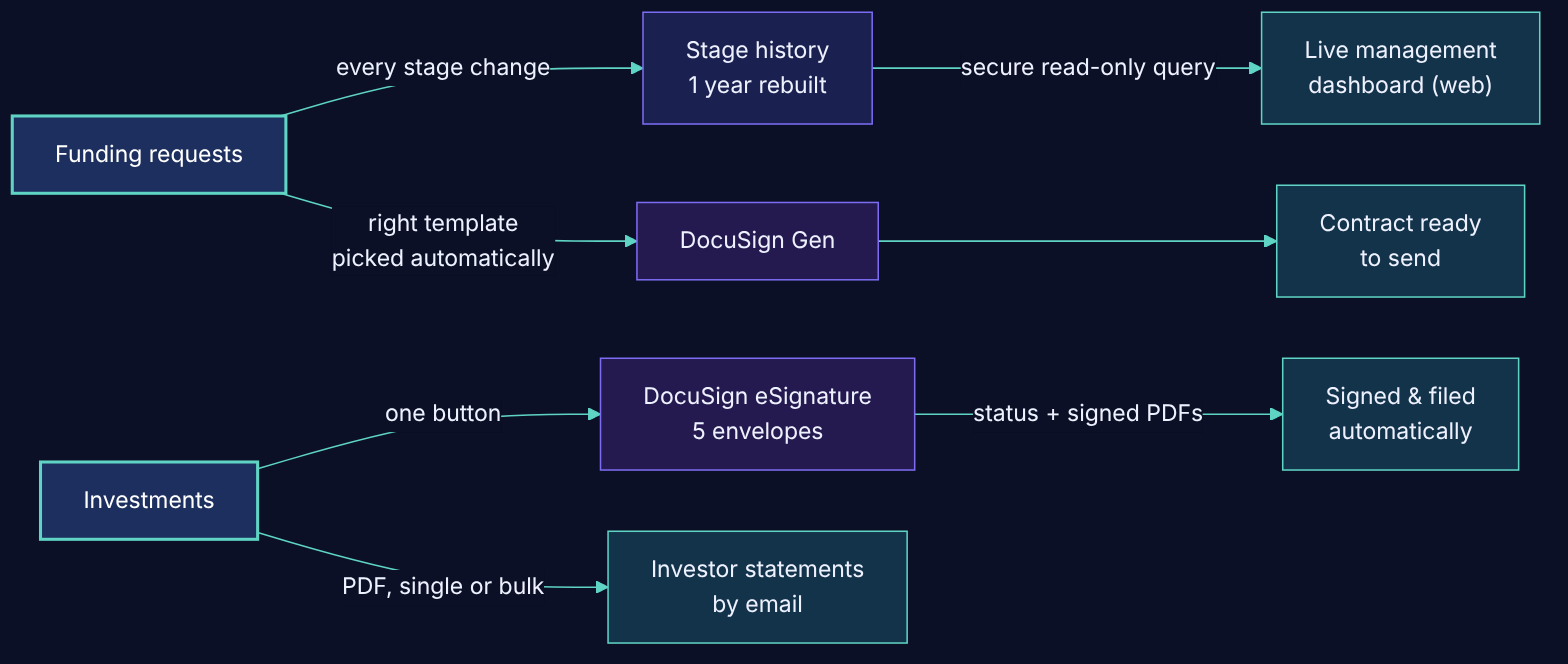
1. One button, five investor documents
A single "Send for Signature" button on each investment sends every document as its own envelope to the right people, including a guarantor only when needed. Each status updates by itself as people sign, and signed PDFs are filed back on the record automatically. Two tax and investor forms are pre-filled from Salesforce data. Tech: Apex with the DocuSign Apex Toolkit, guided screen flow with preview checks, DocuSign Gen Word templates, templates converted from PDF forms, status-driven record-triggered flow.
2. Contracts that come out ready to send
The right contract template is now picked automatically by brand, state and deal shape. A clean single-advance version is generated from the master template, so most contracts no longer carry empty sections. Payee lines print properly, with room for more payees and amounts formatted like $1,234.56. Tech: DocuSign Gen templates under version control, Python tooling that edits Word files safely, formula-based template routing, flow-built payee lines.
3. Investor statements in one click
Quarterly investor statements as PDFs, previewed and emailed per investor or in bulk, with optional totals and the ability to choose which investments and recipients to include. Tech: Apex report builder shared by PDF and preview, Visualforce PDF, Aura launcher, invocable emailer, 20+ tests.
4. Live visibility for management
Every time a funding request changes stage, Salesforce now records when it entered, when it left and who moved it. A full year of history was rebuilt from the audit trail. On top of it: Salesforce reports, plus a fast web dashboard where managers sign in with their Salesforce login and see where every request sits, time in each stage, and what's waiting. Tech: stage-history object + record-triggered flow, backfill from field history, custom report type and dashboard. Web app in React + TypeScript on Vercel, reading Salesforce through a read-only integration user (OAuth client credentials) with Salesforce sign-in (OAuth + PKCE).
5. Clean data that stays clean
Possible duplicate clients and cases are flagged as they're created or edited, and staff merge them in a guided screen that shows exactly what will move before anything changes. A "Change Law Firm" button moves a case and its open deals together, while funded history stays where it belongs. Tech: Apex duplicate detector and merge engine with verification and rollback, single-transaction screen flows, automated alerts.
6. Guardrails and data quality
Requests can't reach contract stages with missing values. Approved amounts are protected. Names, owners and labels were fixed across the database, with automations so they stay fixed.
Also delivered
- A developer sandbox filled with realistic invented data, so an outside party could test safely (0 real data)
- Six illustrated user guides with annotated screenshots (the investor guide alone runs 28 pages)
Results
| Item | Detail |
|---|---|
| 20+ hours | saved every week across the team |
| 92% | of contracts now go out without manual cleanup (dozens of empty lines removed per contract) |
| 5 | investor documents from one button, filed automatically within ~2 minutes of the last signature (in end-to-end tests) |
| 55,000+ | stage-history records rebuilt from the audit trail, 0 failures |
| 1,800+ | records fixed in data-quality jobs, each re-run showing 0 left |
| ≤ 5 min | how old the dashboard data ever is, using a tiny fraction of the daily API allowance |
| 6 | illustrated user guides |
Tools and skills
Apex (callouts, invocable actions, test classes) · Record-triggered, scheduled and screen Flows · Visualforce PDF · Aura · DocuSign Gen and eSignature Apex Toolkit · Custom report types and dashboards · Sharing rules for multi-brand separation · Permission sets and pilot releases · OAuth integrations and integration users · React + TypeScript · Vercel · Salesforce CLI · Python · Git
Start with a 30-minute call
Tell us what's slowing your team down. You'll get an honest read on what to fix first, even if the answer is that you don't need us.